Car care gear
OBD2 Scanner for Beginners: What It Can Tell You
By Samveg Jain · Updated 21 October 2026 · 6 min read
Some links on this site may be affiliate links. If you buy through them we may earn a commission, at no extra cost to you. It never changes what we recommend. How this works.
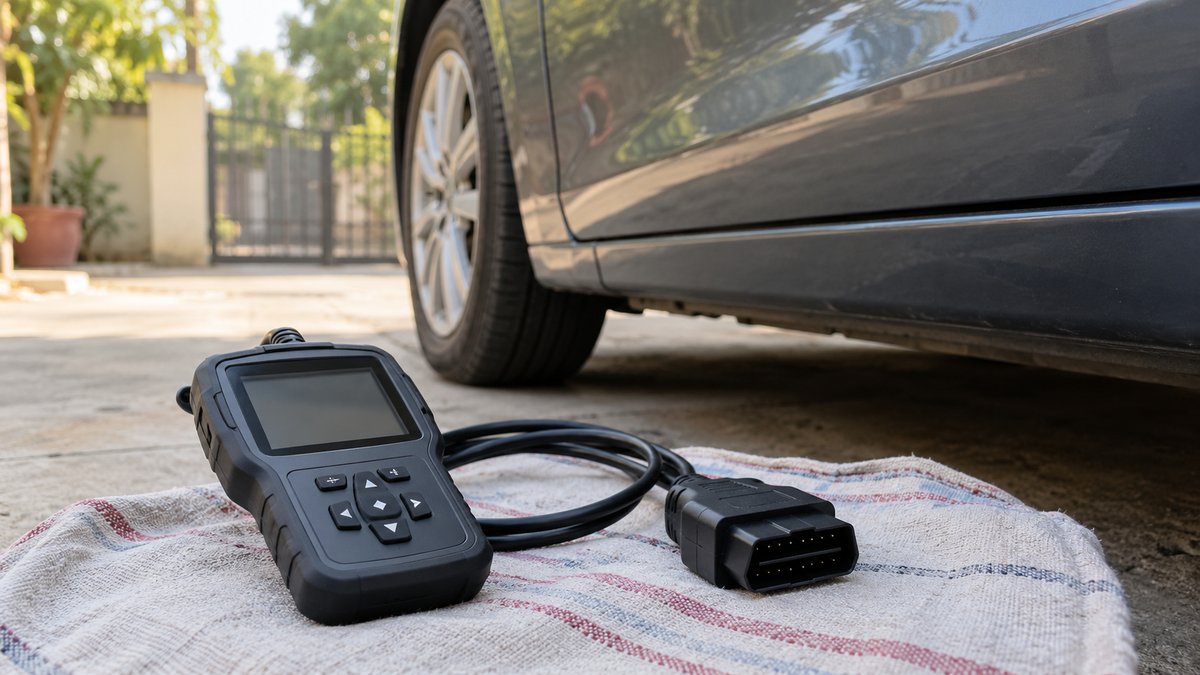
Buy an OBD2 scanner for confirmed coverage, readable reports and the specific information you need. A basic reader can help record engine-related emissions codes, but it cannot diagnose every fault or prove which part needs replacing. Check your exact vehicle details before purchase, and use the results to support a workshop conversation rather than to override a warning light.
Know what the connector can and cannot promise
Many tools advertise a familiar 16-pin connector and broad compatibility. That shape does not prove full access to every car sold in India. Vehicle year, fuel type, market version and supported protocols all matter. Ask for an explicit compatibility statement using your registration-year and vehicle details, rather than assuming a foreign model-year rule applies locally.
EPA's description of onboard diagnostics explains that the system monitors emissions-related operation and stores diagnostic codes and operating conditions when relevant faults are detected. A generic reader is useful within that scope. It does not follow that it can read a parking sensor, an airbag controller or every manufacturer's private module data.
Electric vehicles and some specialised systems may need different support from the generic engine-emissions features prominently advertised on a listing. If you want one particular function, obtain written confirmation that it works on your exact vehicle. A long menu screenshot may show the tool's total possible functions rather than those available for your car.
Standalone reader or phone adapter
A standalone reader has its own display and cable. It avoids pairing a phone and can be convenient for occasional checks at home. Compare screen readability, button layout, cable length and report export. A tool that shows a short code without a usable description may leave you copying information by hand.
A phone adapter uses an app for its interface. Check phone operating-system support, app availability, permission requests and ongoing costs. Some advertised functions may require a separate subscription or paid extension. Prefer a documented relationship between adapter and software rather than an anonymous download link or a claim that any app will work.
Wireless convenience adds another connection to troubleshoot. Read instructions for pairing, disconnecting and removing the adapter. Do not leave an unfamiliar device installed indefinitely because it is small. A protruding adapter can also interfere with the driver's legs or surrounding trim, depending on where the diagnostic socket sits.
A useful beginner feature list
- Read and save stored and pending codes where the vehicle supports them.
- Display freeze-frame data so the recorded operating context can be discussed.
- Show emissions readiness information without presenting it as a local compliance certificate.
- Provide clear descriptions while preserving the original code identifiers.
- Export or photograph results without needing to operate a phone while driving.
- Explain supported vehicles, modules and any extra app fees before purchase.
Avoid paying for service resets or coding functions you do not understand. Those can change vehicle settings or maintenance records, and their availability depends on compatibility. A beginner's first useful task is reading and documenting information. Writing changes to controllers is a different level of responsibility from viewing a code.
Read the result as a clue
A code can describe a condition in a circuit or a measured value outside an expected range. The cause may involve wiring, connectors, a sensor, an air leak or another system. Replacing the part named in an online search can miss the underlying fault and create more work. Ask what tests distinguish the possible causes.
Record the code exactly, including letters and numbers. Save whether it was pending or stored and any available freeze-frame information. Note the symptoms, when the light appeared and whether the vehicle had recently been serviced. These observations help a technician more than a screenshot labelled with a guessed diagnosis.
Do not clear a warning merely to see a clean dashboard before a trip. Clearing can erase useful evidence and reset monitoring information. A warning that returns is not a meaningful repair test without understanding the condition. If you are planning a journey, leave time for investigation instead of using a reader as a last-minute permission slip.
Safe connection matters
Locate the diagnostic connector from the vehicle documentation. Work while parked safely, with the parking brake applied, and follow the scanner and vehicle instructions for ignition state and connection order. Never force a connector or probe pins with improvised wires. Check the manufacturer's instructions before starting any diagnostic session.
Keep cables clear of pedals and seat movement. Live-data viewing can distract as much as a phone screen, so do not watch diagnostic readings while driving. Road testing belongs with a competent person using an appropriate procedure. If a warning or symptom suggests the car is unsafe, stop and seek assistance instead of concentrating on the scanner.
Keep a torch and basic documentation nearby. The budget accessories guide covers practical small purchases that can make inspection easier. A roadside safety kit remains a separate requirement; a scanner does not make a poor stopping location safe.
Compare coverage before feature counts
For occasional code reading, a clearly supported basic reader may be enough. Choose a multi-system unit only when you need documented access to additional modules and can understand its limitations. Confirm whether software updates are included, how long support is available and what happens if you change vehicles or phones.
Keep the receipt, compatibility statement and software details together. After the first successful connection, save a sample report so you know how to retrieve one later. Add scanner checks to maintenance planning rather than making them the centre of your road trip preparation. Reliable servicing, sound tyres and attention to symptoms remain more useful than a long list of unread data fields.
What to look for when you buy
Standalone basic code reader
Confirmed vehicle compatibility, stored code display and freeze-frame support.
Phone-connected diagnostic adapter
A supported app, clear ongoing costs and a documented privacy policy.
Multi-system diagnostic reader
Explicit coverage for the exact vehicle and required control modules.
Frequently asked questions
Will any 16-pin scanner work with my car?
Connector shape alone does not confirm compatibility. Check the vehicle year, fuel type, market and supported diagnostic protocols.
Does a fault code identify the part to replace?
No. A code identifies a detected condition that needs further diagnosis.
Should I clear codes before visiting a workshop?
Record codes and freeze-frame information first, and avoid clearing them merely to hide a warning. Clearing can remove useful diagnostic evidence.
Can a basic scanner read ABS and airbags?
Not necessarily. Generic emissions support does not guarantee access to those systems.
More guides
Car care gear
Car Cleaning After Diwali: Remove Ash Without Scratching
A rinse-first cleaning routine for the morning after Diwali, with separate steps for paint, glass and the cabin.

Car care gear
Car Wax for Winter: Dust, Fog and Paint Care
Choose wax or sealant for clean paint, then manage winter dust and damp with gentle washing, careful drying and sensible parking.
Car care gear
Clean the Car Interior Before Festive Travel, Zone by Zone
A practical order for cleaning the boot, seats, floor, dashboard, vents and glass, with drying and child-seat checks before travel.