Power & charging
Car Phone Charging for Long Road Trips
By Samveg Jain · Updated 27 October 2026 · 5 min read
Some links on this site may be affiliate links. If you buy through them we may earn a commission, at no extra cost to you. It never changes what we recommend. How this works.
Quick answer
Choose a charger that matches your phone, cable and vehicle socket limits. Secure the phone and route its cable away from controls before setting off.
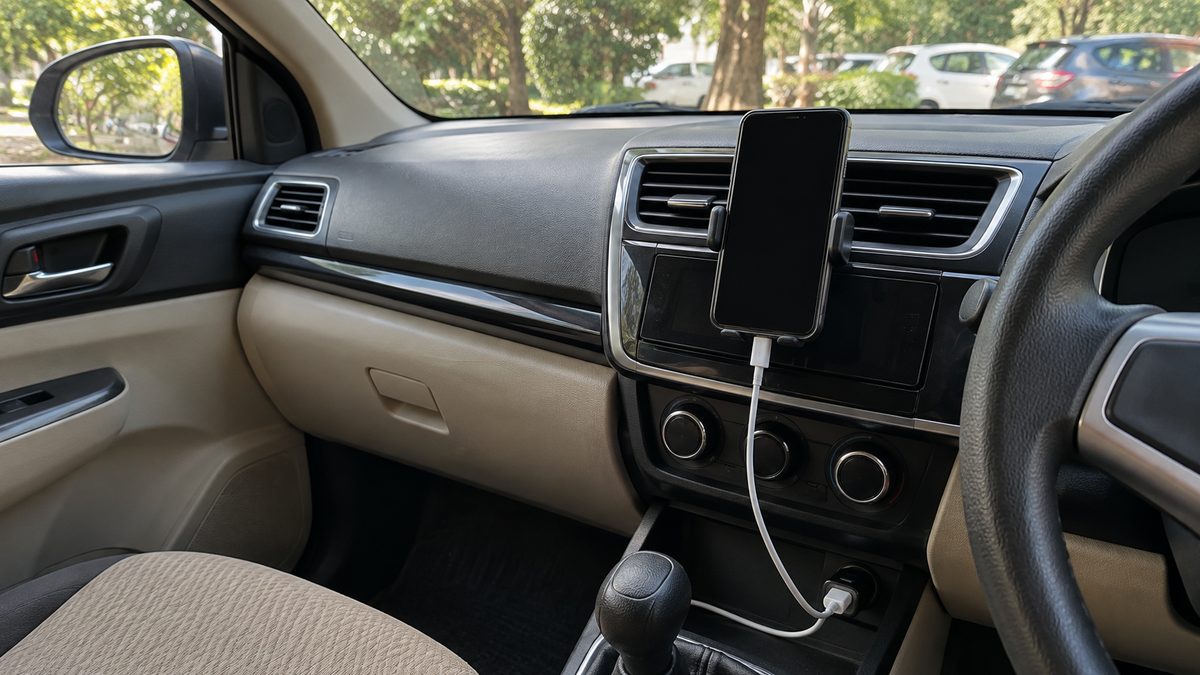
For a long road trip, use a car phone charger that suits your phone, cable and vehicle socket, then secure the cable before driving. Check the output available from each port rather than choosing by connector shape alone. A phone that charges reliably on the driveway can still struggle with navigation, a bright screen and a hot cabin.
Prepare the arrangement before leaving home, particularly when several passengers need power. This is general equipment guidance: the car handbook and the device instructions decide what your sockets can supply. For mounting and device-use requirements, check the current rules where you drive.
Identify what each socket and port can supply
A round accessory socket needs a suitable plug-in charger; a built-in USB port may provide charging, data or both. Read the handbook before assuming a port intended for media will charge a busy phone quickly. USB-A and USB-C describe connector types. Their shape does not tell you every supported charging mode or available output.
Read the charger specifications for output with several devices connected. A large combined rating can be shared between ports, so plugging in a second phone may change the first phone's charging rate. Match the phone's supported charging system with the charger and cable. The mobile charger buying guide covers the purchase checks in more detail.
Trial the complete setup on a familiar drive
Test the phone with the same navigation and audio functions you expect to use on the trip. Start with a partly charged battery and compare the level after a normal journey. Have a passenger make observations, or check only after parking. Do not troubleshoot changing battery percentages while moving.
If the battery keeps falling, try a sound, compatible cable before replacing everything. Inspect both ends for looseness, debris or damage without probing the connectors with metal. A repeated disconnect when the car moves suggests a connection problem that needs attention. Do not wedge a loose plug into place or keep bending it to restore charging.
Pack cables by connector and condition
- Choose cables long enough to reach without tension but short enough to keep away from pedals.
- Check for splitting near plugs, crushed insulation and exposed conductors.
- Keep a tested spare for the phones used for navigation or emergency calls.
- Coil spare leads loosely in a dry pouch rather than wrapping them tightly round the charger.
- Disconnect by holding the plug, not by pulling the cable.
A cable that fits can still have unsuitable charging capability. Use the device and cable specifications, especially for higher-power charging. Keep connector ends out of drink holders and off damp floor mats. Replace damaged leads instead of covering a break with tape and continuing to use them in a vibrating car.
Keep charging leads clear of driving controls
With the vehicle parked, move the seat through its normal adjustment range and check the gear selector, parking brake and steering clearance. Route leads so they cannot fall into the pedal area. Never run them across airbag covers or through a door where closing it can crush the insulation.
A phone should stay secure over bumps without obscuring the road or instruments. The phone holder comparison helps assess attachment positions. Leave enough slack at the device to avoid pulling the connector sideways, then retain the remaining cable in an appropriate location that does not interfere with vehicle equipment.
Manage heat during navigation
Direct sunlight through the windscreen can heat a phone even on a cool winter morning. Charging adds heat, while navigation keeps the screen and processor working. Position the phone away from strong sun where a safe mounting location permits, and avoid covering it with cloth or leaving it on the dashboard.
If a device shows a temperature warning, park safely and follow its cooling instructions. Stop charging when directed and let it cool naturally; do not put it against ice or splash it with water. An unusually hot plug, discolouration or a burning smell calls for stopping use of that accessory and having the cause checked.
Allocate power without overloading the car
Plan which devices need charging first. Keep the navigation phone supplied and rotate less urgent passenger devices during breaks. The socket's permitted load includes the accessories drawing from it, not just the charger you happen to be looking at. Avoid stacking adapters or adding an inflator to an already crowded splitter.
Some cars keep accessory sockets live after the ignition is switched off. Others cut power or provide it only in particular operating modes. Check this at home and follow the handbook. If a socket repeatedly loses power or a fuse fails, obtain a workshop diagnosis instead of installing a higher-rated fuse.
Make charging part of the departure routine
Download suitable route information before departure, charge essential phones at home and pack the spare cable where a passenger can reach it. At rest stops, check that plugs have stayed secure and nothing has become trapped beneath luggage. Use the road trip packing list to group charging supplies with other items needed during the drive.
A dependable arrangement is one you can leave alone once the car moves. If charging fails en route, let a passenger investigate or wait until safely parked. A low battery is inconvenient; reaching down for a fallen connector while driving adds a problem that no charger can solve.
What to look for when you buy
Socket charger
Compatible input, stated output per port and a secure fit in the vehicle socket.
Charging cable
The right connectors and charging capability, with sound insulation and strain relief.
Phone holder
A firm mounting position clear of the driver’s view, controls and airbag areas.
Frequently asked questions
Can passengers charge while the engine is off?
Check how the vehicle powers its sockets and avoid prolonged use that could leave the starting battery discharged.
Does a charging symbol prove the phone is gaining charge?
No. A phone running demanding tasks can consume much of the incoming power. Check its battery level during a parked break.
Can I charge a damp phone?
Follow the phone maker’s moisture warnings. Dry the device and connector as directed before connecting power.
Should I leave the charger fitted overnight?
Unplug removable accessories when parked unless the vehicle and accessory instructions permit unattended use.
More guides
Power & charging
A Charger for a Car Parked for Weeks: What to Check First
Choose a charger for a parked car by battery chemistry, voltage and maintenance mode, with connection checks and clear reasons to stop.
Power & charging
Car Key Fob Battery: Symptoms and Safe Replacement
Identify a weak key fob battery, confirm the exact coin cell and follow a careful replacement process without damaging the casing.
Power & charging
Car Battery Winter Care: Check Before Cold Mornings
Slow starts on cold mornings need diagnosis. Check battery condition, terminals and charging before choosing a compatible replacement.