Power & charging
Car Key Fob Battery: Symptoms and Safe Replacement
By Samveg Jain · Updated 22 October 2026 · 6 min read
Some links on this site may be affiliate links. If you buy through them we may earn a commission, at no extra cost to you. It never changes what we recommend. How this works.
Quick answer
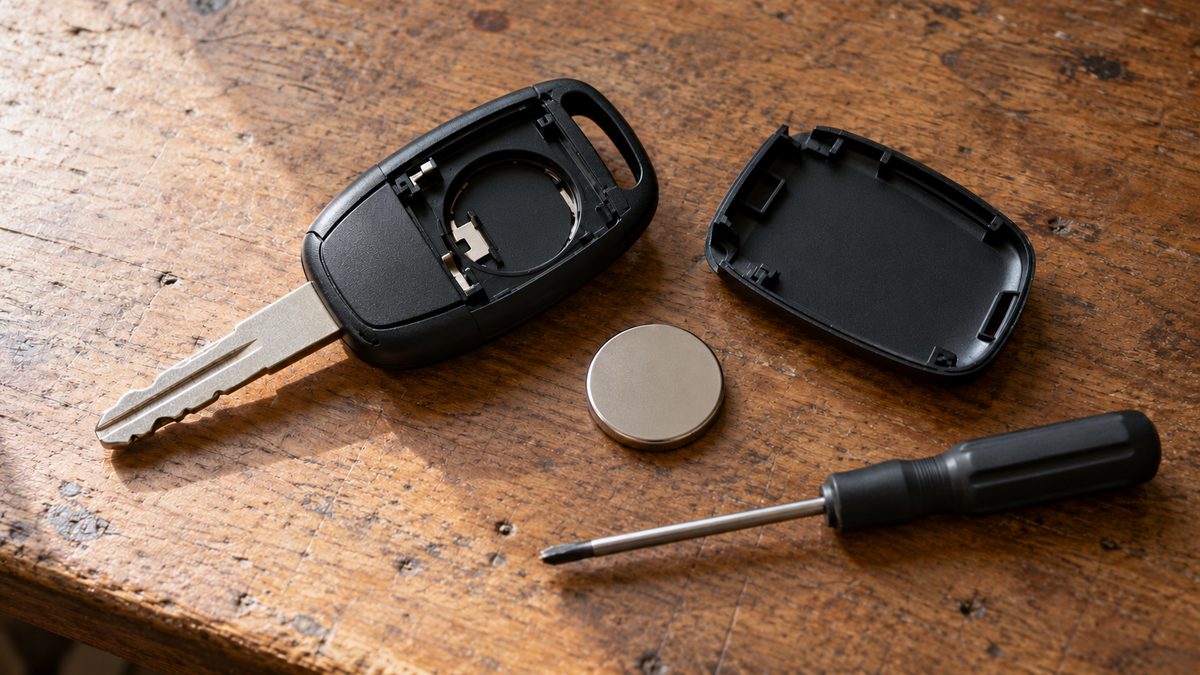
Check the handbook for the exact key-fob battery and opening method before buying a coin cell. Reduced range or a warning can suggest a weak cell, but water damage, interference and vehicle faults can cause similar symptoms.
Replace a key fob battery with the exact coin cell specified for that key, using the opening and refitting method in the vehicle handbook. Reduced remote range or a battery warning can indicate a weak cell, but neither proves the battery is the only fault. Check the emergency entry and starting procedure before the remote stops responding completely.
Recognise a weak remote without confusing two batteries
A remote that works only close to the car, responds intermittently or produces a low-battery message deserves attention. Compare its behaviour in different locations while parked safely. Local radio interference can affect operation, and a dirty or damaged button may fail even with a fresh cell. Note whether every button is unreliable or only one function has stopped working.
The small cell inside a key and the vehicle's starting battery perform different jobs. If both keys fail and the car also has dim lamps or slow cranking, investigate the car rather than buying several remote batteries. Our starting-battery checks explain that separate diagnosis. A remote battery replacement cannot restore power to a discharged vehicle battery.
Identify the cell from approved information
Find the handbook section for your exact key version. Vehicles sold under one model name can have different keys, and replacement cases may conceal that difference. Confirm the cell code, voltage, chemistry and polarity before shopping. Do not choose by diameter alone or assume the battery inside a previously repaired key was fitted correctly.
Read any markings on the removed cell as a cross-check, not a replacement for the instructions. Buy a securely packaged cell from a reliable source and keep it sealed until use. A different thickness can distort contacts or prevent the case closing properly. Never stack thinner cells, add foil or bend contacts to make a mismatched battery reach the terminals.
Keep coin cells away from children throughout the job
Coin cells can cause severe internal injury if swallowed. Work at a clear surface away from children and pets, and account for both the old and new cell. Do not leave a removed battery loose on a table, in a pocket with coins or in an open bin. Use secure storage until it can go to an appropriate collection point.
If swallowing or insertion is suspected, seek emergency medical help immediately and follow current official medical guidance; do not wait for symptoms. Keep the packaging or cell identification available for the clinician if that can be done without delaying care. A battery that no longer powers a remote must still be treated as hazardous around children.
Open the case without damaging its clips
Remove any mechanical key blade only by the release method described in the handbook. Locate the intended opening point and use the specified tool. Do not pry against a decorative seam merely because it looks accessible. Stop if the case resists, a screw head starts to strip or the opening method differs from the illustration for your key.
Work over a clean tray so a small seal, spring or button component cannot disappear. Observe the cell orientation before removal without touching circuitry unnecessarily. Keep liquid cleaners away from the board, and do not scrape electrical contacts with a sharp tool. Corrosion, a cracked casing or evidence of water ingress warrants assessment by a competent key specialist or authorised workshop.
Follow a controlled replacement sequence
- Confirm you have the correct cell and readable instructions before opening the fob. Keep the spare key accessible outside the locked car so a mistake during testing does not leave your only working key inside.
- Open the housing using its designated release, with light pressure and the right tool. Put loose parts in the tray in the order removed, keeping the mechanical blade away from exposed electronic parts.
- Remove and secure the old cell. Inspect the holder for obvious damage without reshaping it, then fit the new battery with polarity exactly as shown in the instructions and any moulded markings.
- Refit the seal and case without trapping components. The casing should close as designed; forcing it or relying on tape can conceal a misplaced part and weaken protection against everyday moisture.
- Test remote locking, door opening and starting while the car is parked safely. Keep doors accessible during initial checks and use any specified resynchronisation procedure only when the handbook calls for it.
Test the backup entry method before travel
Many cars provide a hidden mechanical lock or a designated key-detection position for emergency starting. The location and procedure vary, so find your own instructions in advance. Do not force a trim cap or repeatedly press buttons when the handbook describes a different emergency method. Practise only the steps the maker permits without dismantling unrelated parts.
Add key checks to the pre-trip inspection, particularly before leaving for a wedding or an early-morning drive. Share the emergency procedure with another authorised driver. Keep spare keys secure and separate from the main key, rather than storing both together in a bag that could be lost or locked inside the car.
Check the casing before buying another cover
Inspect the original buttons and the case joint after replacement. A damaged button membrane or broken latch can allow movement or contamination even when the new cell works. An accessory shell must suit the exact fob and should not conceal a case that no longer closes securely. Avoid attaching a large bundle of objects that repeatedly strikes the key. If you need a replacement casing, check that transferring the electronics and any immobiliser component is an appropriate specialist job rather than assuming the circuit board is the only part that matters.
Know when a fresh battery is not the repair
If the warning remains, recheck specification, orientation and case assembly against the instructions. Do not repeatedly dismantle the key or try internet programming sequences intended for another model. A faulty holder, damaged electronics or a vehicle receiver issue needs diagnosis. Tell the repairer about previous water exposure, drops and the exact symptoms before and after replacement.
For journey planning, the road-trip packing list can help keep essential access items organised. Pack the handbook or an offline copy of its emergency section where it remains available. Finish the replacement by securing the old cell for proper disposal and recording the correct cell code somewhere safer than relying on memory.
What to look for when you buy
Specified coin cell
The exact cell code, voltage and chemistry required for this key version.
Suitable opening tool
The tool and opening point described by the key or vehicle maker.
Replacement case seal if required
A correct model-specific seal and fitting instructions, assessed before reopening a damaged case.
Frequently asked questions
Can I use a rechargeable coin cell with the same diameter?
Only if explicitly specified. Matching size does not establish suitable voltage or chemistry; use the exact approved cell.
Should I replace the spare key battery at the same time?
Check its condition and the maker?s guidance. Test the spare periodically and avoid leaving a known weak spare as your only backup.
Does a new cell need key programming?
Routine cell replacement often does not, but procedures vary. Use the handbook and seek authorised help if recognition is lost.
Can a dead remote prevent mechanical entry?
Many vehicles provide an emergency entry method, but designs differ. Learn the handbook procedure before you need it.
More guides
Power & charging
A Charger for a Car Parked for Weeks: What to Check First
Choose a charger for a parked car by battery chemistry, voltage and maintenance mode, with connection checks and clear reasons to stop.
Power & charging
Car Battery Winter Care: Check Before Cold Mornings
Slow starts on cold mornings need diagnosis. Check battery condition, terminals and charging before choosing a compatible replacement.
Power & charging
Car Mobile Charger Buying Guide: Ports and Fit
Choose a car charger that fits the socket securely, powers your usual devices together and lets cables reach safely without crossing controls.